
For many software companies, customer support becomes more expensive as the user base grows. More customers often means more tickets, longer queues, larger support teams, and higher operational pressure. Self service SaaS helps reverse that pattern by giving users the tools, guidance, and information they need to solve common issues without contacting a support agent.
TLDR: Self service SaaS can reduce customer support costs by deflecting repetitive tickets, shortening resolution times, and helping customers complete tasks independently. For example, a SaaS company receiving 10,000 monthly support requests could reduce live agent tickets by 30% with a strong help center, chatbot, and in app guidance. If each ticket costs $6 to handle, that reduction could save around $18,000 per month. The result is lower support spending, faster customer answers, and a more scalable service model.
Contents
- 1 Why Support Costs Rise in SaaS Businesses
- 2 What Self Service SaaS Includes
- 3 How Self Service Reduces Ticket Volume
- 4 Improving Agent Productivity
- 5 Lowering Onboarding Costs
- 6 Providing 24 Hour Support Without 24 Hour Staffing
- 7 Reducing Churn Through Faster Answers
- 8 Using Analytics to Improve Support Efficiency
- 9 Best Practices for Implementing Self Service SaaS
- 10 FAQ
Why Support Costs Rise in SaaS Businesses
SaaS companies face a unique support challenge because their products are always active, frequently updated, and often used by customers across different time zones. Every new feature, pricing change, onboarding flow, or integration can generate fresh questions. If every question requires a human response, support expenses can grow quickly.
Common cost drivers include:
- High ticket volume from repeated questions about billing, passwords, setup, and account access.
- Long onboarding periods that require agents to guide customers step by step.
- Complex product features that create dependency on expert support staff.
- Global customer expectations for fast answers outside normal business hours.
- Agent burnout and turnover, which increase hiring and training costs.
Self service does not eliminate the need for customer support. Instead, it allows support teams to focus on complex, high value issues while routine requests are handled automatically or independently by the customer.
What Self Service SaaS Includes
Self service SaaS refers to product features and support resources that let users find answers or complete tasks without direct help from a support representative. These tools are usually integrated into the customer experience and are available at any time.
Typical self service components include:
- Knowledge bases with articles, tutorials, screenshots, and troubleshooting steps.
- AI chatbots that answer frequent questions and route advanced issues to agents.
- In app guidance, such as tooltips, walkthroughs, checklists, and product tours.
- Customer portals for billing, subscription changes, account management, and invoices.
- Community forums where users can share solutions and best practices.
- Status pages that inform customers about outages, maintenance, or system delays.
When these elements are well organized, customers can solve many issues in minutes instead of waiting hours or days for an agent response.
How Self Service Reduces Ticket Volume
The most direct way self service SaaS reduces costs is through ticket deflection. This happens when a customer finds an answer before submitting a request. In most SaaS environments, a large percentage of tickets are repetitive. Questions such as “How does the user reset a password?”, “Where is the invoice?”, or “How can a subscription be upgraded?” do not usually require a trained agent.
If a knowledge base article or chatbot can answer these questions accurately, the support team receives fewer tickets. Fewer tickets mean fewer labor hours, less pressure to hire additional agents, and faster service for customers who genuinely need personalized help.
For example, if a company handles 5,000 monthly tickets and 40% are simple account or billing questions, self service tools might resolve half of those automatically. That would remove 1,000 tickets per month from the queue. With an average handling cost of $5 per ticket, the company could save $5,000 monthly on those requests alone.
Improving Agent Productivity
Self service does more than reduce the number of incoming tickets. It also helps support agents work more efficiently. When customers submit fewer basic questions, agents can spend more time on complex technical issues, enterprise accounts, and cases that affect retention.
A well maintained help center can also serve as an internal resource for support teams. Instead of writing the same instructions repeatedly, agents can link to approved articles. This improves consistency and reduces response time.
In many SaaS companies, support agents lose significant time switching between tools, rewriting explanations, and searching for product information. Self service content creates a shared source of truth. That makes training easier for new employees and helps experienced agents resolve tickets faster.
Lowering Onboarding Costs
Onboarding is one of the most expensive stages in the customer journey. New users often need help understanding product value, setting up accounts, inviting team members, configuring integrations, and learning workflows. If every new customer requires several live support sessions, the cost of acquisition rises.
Self service SaaS can reduce onboarding costs with interactive tutorials, setup checklists, templates, video guides, and contextual prompts. These resources allow customers to move at their own pace while still receiving clear guidance.
For instance, a project management SaaS platform might use an in app checklist that guides users through creating a workspace, adding teammates, assigning a task, and setting a deadline. Instead of contacting support, the customer learns by doing. This reduces early friction and helps the customer reach value faster.
Providing 24 Hour Support Without 24 Hour Staffing
Customers often expect instant answers, especially when SaaS products are used for business critical tasks. However, staffing a live support team around the clock can be expensive. It may require multiple shifts, regional teams, or outsourced support partners.
Self service resources are available at all times. A customer in one country can read a troubleshooting article, use a chatbot, or check a system status page while the company’s main support team is offline. This improves customer experience without increasing payroll costs.
While urgent issues may still require escalation, many after hours questions can be answered automatically. This reduces the need for large night and weekend support teams.
Reducing Churn Through Faster Answers
Customer support cost reduction should not come at the expense of customer satisfaction. Poor self service can frustrate users if answers are outdated, difficult to find, or too generic. However, strong self service can improve satisfaction because customers often prefer quick independent solutions over waiting for a reply.
Fast answers can also reduce churn. When users cannot complete a task or fix a problem, they may stop using the product. If self service helps them solve the issue immediately, the company protects recurring revenue and reduces the burden on customer success teams.
The cost benefit is therefore not only about fewer tickets. It is also about keeping customers engaged, reducing cancellation risk, and improving product adoption.
Using Analytics to Improve Support Efficiency
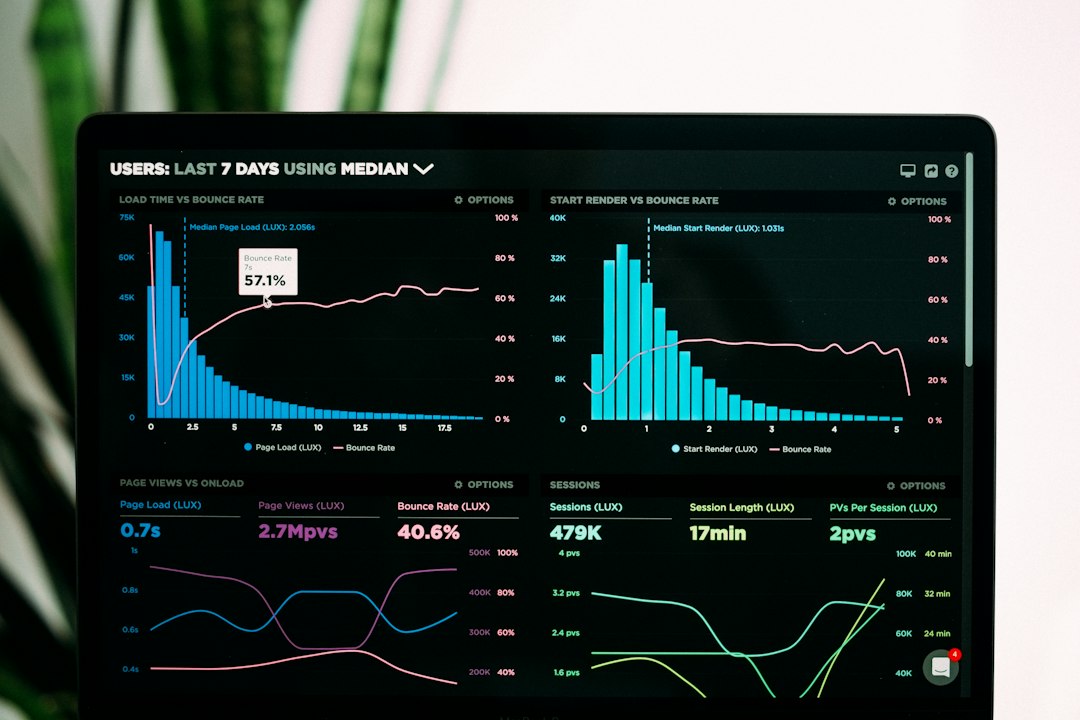
One of the strongest advantages of self service SaaS is that it produces useful data. Companies can track which articles are viewed most often, which chatbot questions fail, which searches return no results, and which product areas generate the most confusion.
These insights help teams improve both support content and the product itself. If many users search for “export reports”, the company may need better documentation or a clearer product interface. If a chatbot cannot answer a recurring question, that gap can become a new help article.
Useful metrics include:
- Ticket deflection rate, showing how many users find answers before contacting support.
- First contact resolution, showing how often issues are solved in one interaction.
- Help article satisfaction scores, showing whether content is useful.
- Search failure rate, showing where customers cannot find answers.
- Cost per ticket, showing the financial impact of support volume changes.
Best Practices for Implementing Self Service SaaS
To reduce costs effectively, self service must be easy to use, accurate, and connected to real customer needs. A large help center with poor organization may create more frustration than savings.
Companies should follow several best practices:
- Start with high volume tickets and turn the most common questions into clear self service content.
- Use simple language so customers can understand answers without technical support knowledge.
- Add visuals, such as screenshots, short videos, and annotated steps.
- Place help inside the product so users find guidance at the moment they need it.
- Update content regularly after product releases or policy changes.
- Offer escalation paths so customers can still reach a human when self service is not enough.
The best self service systems do not force customers away from support. Instead, they make independent problem solving the easiest first option while keeping human help available for more complex situations.
FAQ
How does self service SaaS reduce customer support costs?
It reduces costs by lowering ticket volume, automating answers to repetitive questions, shortening resolution times, and allowing agents to focus on complex issues instead of routine requests.
What are the most important self service tools for SaaS companies?
The most useful tools usually include a searchable knowledge base, AI chatbot, in app guides, customer account portal, status page, and analytics dashboard.
Can self service replace human support?
No. Self service is best used to handle common and repetitive issues. Human agents are still important for technical problems, sensitive billing issues, enterprise support, and customer relationship management.
How can a company measure self service success?
Companies can track ticket deflection rate, article views, chatbot resolution rate, customer satisfaction, search success, agent response time, and total cost per support ticket.
What is the biggest mistake in self service SaaS?
The biggest mistake is creating self service content and then failing to maintain it. Outdated or confusing resources can increase frustration and lead to more support requests instead of fewer.

