
Remote work has shifted from a temporary solution to a long-term operating model for many organizations. To keep distributed teams productive, aligned, and engaged, leaders need more than good intentions; they need the right digital systems. The best tools for managing remote employees help teams communicate clearly, track progress, share knowledge, measure performance, and maintain a healthy work culture across locations and time zones.
TLDR: Managing remote employees efficiently depends on using tools that support communication, project visibility, collaboration, time tracking, documentation, and employee engagement. Platforms such as Slack, Microsoft Teams, Asana, Trello, Notion, Zoom, and Google Workspace help remote teams stay organized and connected. The most effective organizations choose tools based on workflow needs, team size, security requirements, and ease of adoption.
Contents
Why Remote Team Management Tools Matter
Remote teams face challenges that office-based teams may solve naturally through in-person interaction. Employees can feel disconnected, priorities may become unclear, and managers may struggle to understand workloads without micromanaging. Well-selected tools create structure, support transparency, and make collaboration easier without constant meetings.
However, more tools do not automatically mean more efficiency. A strong remote management system usually includes a focused combination of platforms: one for communication, one for project management, one for documentation, one for meetings, and one for performance or time insights. The following tools are among the most powerful options for organizations managing remote employees.

15 Powerful Tools for Managing Remote Employees Efficiently
1. Slack
Slack is one of the most popular communication tools for remote teams. It allows employees to organize conversations into channels, send direct messages, share files, and integrate with other workplace apps. Managers can create channels for departments, projects, announcements, and social interaction.
Its biggest advantage is reducing email clutter while keeping communication searchable. For remote employees, Slack helps recreate the quick, informal conversations that happen naturally in an office.
2. Microsoft Teams
Microsoft Teams combines chat, video meetings, file sharing, and collaboration in one platform. It is especially useful for organizations already using Microsoft 365. Employees can collaborate on Word, Excel, and PowerPoint documents directly inside Teams.
For managers, Teams offers a centralized environment where conversations, meetings, and files stay connected. It is particularly effective for companies that need enterprise-level security and administrative controls.
3. Zoom
Zoom remains a leading video conferencing tool for remote work. It supports team meetings, webinars, one-on-one check-ins, training sessions, and virtual events. Features such as breakout rooms, screen sharing, recording, and live captions make it valuable for both collaboration and learning.
When used thoughtfully, Zoom helps remote employees build trust and connection. However, managers should balance video meetings with asynchronous communication to avoid meeting fatigue.
4. Asana
Asana is a powerful project management platform that helps remote teams plan, assign, and track work. Managers can create projects, set deadlines, define task owners, and monitor progress through lists, boards, timelines, and calendars.
Asana is especially helpful for teams handling complex projects with multiple dependencies. It gives employees clarity about priorities and helps managers identify delays before they become serious problems.
5. Trello
Trello uses a simple board-and-card system that makes task management visual and easy to understand. Teams can create boards for projects, move cards through workflow stages, and add checklists, labels, attachments, and due dates.
Its simplicity makes Trello ideal for smaller teams or organizations new to structured project management. Remote employees can quickly see what is planned, what is in progress, and what has been completed.
6. Monday.com
Monday.com is a flexible work management platform designed to support projects, workflows, operations, and team planning. It offers customizable dashboards, automation, workload views, and integrations with many popular apps.
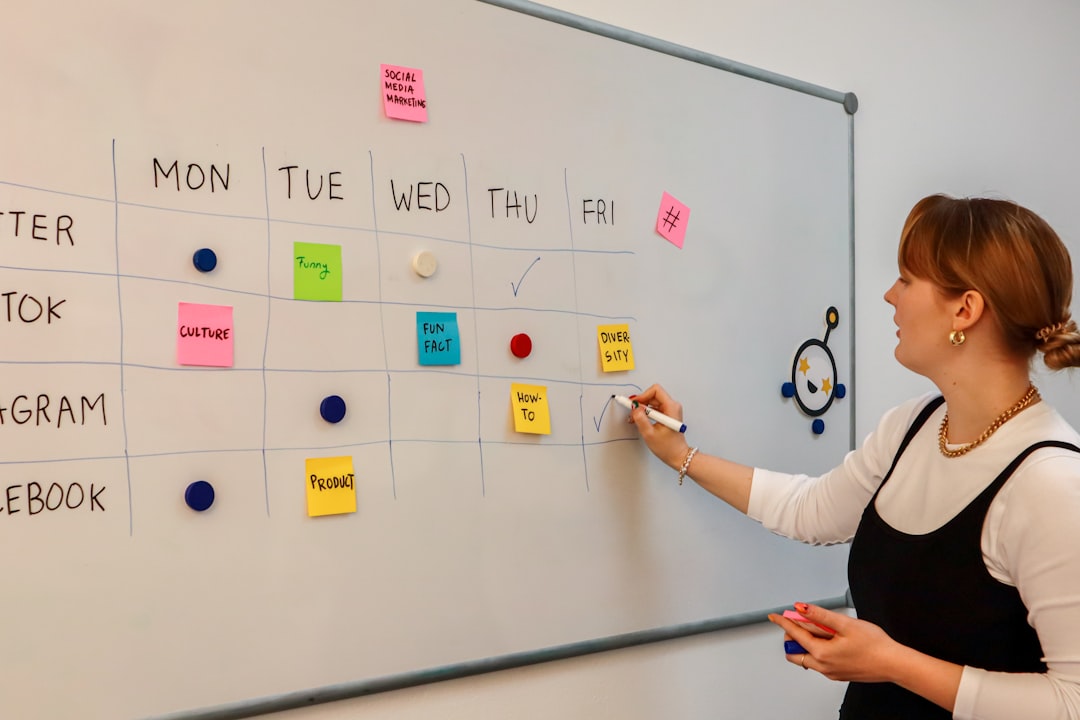
Managers can use Monday.com to track goals, assign tasks, monitor capacity, and visualize team performance. Its colorful interface and adaptable workflows make it suitable for marketing, operations, sales, product, and HR teams.
7. ClickUp
ClickUp is an all-in-one productivity platform that combines task management, documents, goals, dashboards, chat, and time tracking. It is useful for remote teams that want to reduce the number of separate tools they use.
Managers can organize work by spaces, folders, lists, and tasks. ClickUp also offers multiple views, including lists, boards, calendars, Gantt charts, and workload views. This flexibility helps different teams work in the format that suits them best.
8. Notion
Notion is a workspace for documentation, knowledge management, planning, and collaboration. Remote teams can use it to create company wikis, onboarding guides, meeting notes, project briefs, content calendars, and databases.
In remote environments, documentation is essential. Notion helps reduce repeated questions by giving employees a reliable place to find processes, policies, and project information. It supports asynchronous work by making knowledge available at any time.
9. Google Workspace
Google Workspace includes Gmail, Google Drive, Google Docs, Google Sheets, Google Slides, Google Meet, and shared calendars. It is one of the most widely used collaboration suites for remote teams.
Employees can co-edit documents in real time, leave comments, organize files, and schedule meetings across time zones. For managers, Google Workspace provides a dependable foundation for communication, document collaboration, and file management.
10. Dropbox
Dropbox is a cloud storage and file-sharing platform that helps remote employees access important files from anywhere. It is particularly useful for teams that work with large files, creative assets, client documents, or shared folders.
Dropbox supports version history, file recovery, permissions, and integrations with productivity tools. These features help prevent confusion about file ownership and reduce the risk of lost or outdated documents.
11. Loom
Loom allows employees and managers to record quick video messages, screen walkthroughs, tutorials, and updates. It is a valuable tool for reducing unnecessary meetings while still adding a personal touch.
Remote managers can use Loom to explain tasks, give feedback, introduce new processes, or summarize project updates. Employees can watch recordings when their schedules allow, making it especially useful for asynchronous teams across time zones.
12. Miro
Miro is an online whiteboard platform designed for brainstorming, planning, mapping, and visual collaboration. It helps remote employees participate in workshops, strategy sessions, product planning, and design thinking exercises.
Teams can use sticky notes, diagrams, templates, voting tools, and visual boards to collaborate in real time or asynchronously. Miro makes creative collaboration more interactive and helps distributed teams think together, even when they are not in the same room.
13. Time Doctor
Time Doctor is a time tracking and productivity analytics tool. It helps managers understand how remote employees spend their working hours, which projects take the most time, and where productivity may be blocked.
Used responsibly, Time Doctor can support better planning and workload management. Organizations should communicate clearly about how tracking data is used so employees do not feel unfairly monitored. The goal should be transparency and improvement, not surveillance.
14. 15Five
15Five is an employee performance and engagement platform that supports check-ins, feedback, recognition, goals, and performance reviews. It is designed to help managers maintain strong relationships with employees, even when teams are remote.
Weekly check-ins allow employees to share wins, challenges, priorities, and morale updates. Managers can respond with support before small issues become larger problems. This makes 15Five useful for building trust and keeping employees engaged.
15. Deel
Deel helps companies manage international employees and contractors. It supports global hiring, contracts, payroll, compliance, and payments in multiple countries. For remote-first companies hiring across borders, this type of platform can be essential.
Managing remote employees efficiently is not only about communication and tasks. It also includes legal compliance, payroll accuracy, benefits administration, and contractor management. Deel helps simplify these operational challenges for distributed organizations.
How Organizations Should Choose the Right Tools
Selecting remote management tools requires careful planning. A company should first identify its biggest operational gaps. If communication is scattered, a platform such as Slack or Microsoft Teams may be the priority. If projects lack visibility, Asana, Trello, Monday.com, or ClickUp may provide the structure needed.
Leaders should also consider the following factors:
- Ease of use: Tools should be simple enough for employees to adopt quickly.
- Integration: Platforms should connect with existing systems to avoid duplicated work.
- Security: Remote teams need strong access controls, permissions, and data protection.
- Scalability: Tools should support the organization as it grows.
- Cost: Pricing should match the value delivered and the size of the team.
- Employee experience: Tools should make work easier, not create unnecessary complexity.
The best approach is often to test a tool with a small team before launching it company-wide. Managers can collect feedback, refine workflows, and provide training before expecting full adoption.
Best Practices for Managing Remote Employees with Tools
Even the most advanced tools require good management habits. Remote employees work best when expectations are clear, communication is consistent, and trust is present. Managers should define where different types of communication happen, such as urgent messages in chat, task updates in project management software, and long-term knowledge in documentation systems.
It is also important to avoid digital overload. Too many notifications, apps, and meetings can reduce focus. Strong remote leaders create simple systems, encourage asynchronous work, and measure outcomes rather than constant online presence.
Regular feedback is another essential practice. Tools such as 15Five, Loom, and Zoom can support meaningful communication, but managers still need to listen carefully, recognize good work, and help employees overcome obstacles.
Conclusion
Remote employee management depends on clarity, connection, and accountability. Tools such as Slack, Microsoft Teams, Zoom, Asana, Trello, Monday.com, ClickUp, Notion, Google Workspace, Dropbox, Loom, Miro, Time Doctor, 15Five, and Deel help organizations build efficient remote work systems.
No single platform solves every challenge. The most efficient remote teams choose tools intentionally, document processes clearly, and use technology to support people rather than control them. When the right tools are combined with thoughtful leadership, remote employees can stay productive, engaged, and aligned from anywhere.
FAQ
What is the best tool for managing remote employees?
There is no single best tool for every organization. For communication, Slack or Microsoft Teams may be best. For project management, Asana, ClickUp, Trello, or Monday.com may work well. The right choice depends on team size, workflow, budget, and business needs.
How can managers track remote employee productivity?
Managers can track productivity through project management tools, goal-setting platforms, regular check-ins, and time tracking software. However, productivity should be measured by results, quality of work, deadlines, and contribution rather than only by hours online.
Are time tracking tools good for remote teams?
Time tracking tools can be useful when they support planning, billing, workload balance, and process improvement. They should be used transparently and ethically so employees understand the purpose and do not feel unnecessarily monitored.
How many tools should a remote team use?
A remote team should use only the tools it truly needs. Most teams benefit from a communication tool, project management platform, video meeting app, cloud storage system, and documentation hub. Adding too many tools can create confusion and reduce efficiency.
How can remote employees stay engaged?
Remote employees stay engaged when they receive clear expectations, regular feedback, recognition, opportunities for growth, and meaningful connection with teammates. Tools can support engagement, but strong leadership and healthy communication are still essential.

