

HubSpot Email Marketing suits teams that want email, CRM data, forms, landing pages, and automation in one place. It is strongest when sales and marketing share the same contact records. Smaller teams may like the free tools, but costs can rise fast once automation, reporting, and higher contact limits matter.
TLDR: HubSpot Email Marketing is a solid choice for teams that need CRM-based email campaigns, segmentation, automation, and reporting under one roof. A software company with 8,000 contacts, for example, could build a welcome workflow that sends 4 emails over 14 days and routes leads with a score above 60 to sales. If that workflow lifts trial-to-demo bookings from 3% to 5%, the gain can be meaningful. The catch is that advanced automation and deeper reporting often require paid plans that may feel expensive for simple newsletters.
Contents
What HubSpot Email Marketing Does Well
HubSpot’s email tool is built around its CRM. That matters. Instead of treating email as a separate channel, HubSpot connects campaigns to contact records, deals, forms, ads, website activity, and sales tasks.
For brands that care about timing and context, this setup is useful. A contact who downloads a pricing guide can receive a different email from someone who only reads a blog post. A returning customer can be excluded from a new lead sequence. Sales teams can see which emails were opened before making a call.
The editor is friendly enough for non-designers. Users can build emails with drag-and-drop sections, edit text, add buttons, insert images, and preview desktop or mobile versions. Templates help speed up production, while brand settings keep common colors and fonts consistent.
Key Features
- Drag-and-drop email builder: Teams can create newsletters, product updates, nurture emails, and event invites without code.
- CRM-based personalization: Emails can include names, company details, lifecycle stages, recent activity, or custom fields.
- List segmentation: Contacts can be grouped by behavior, source, form submissions, page views, email actions, deal stage, and more.
- A/B testing: Paid tiers support testing subject lines, content, send names, and calls to action.
- Analytics: Reports show opens, clicks, unsubscribes, bounces, traffic, conversions, and campaign influence.
- Compliance tools: HubSpot includes subscription types, unsubscribe pages, consent settings, and tools for GDPR-style consent tracking.
The best part is how much context sits beside the email data. A marketer can see that an email produced 400 clicks, but also check whether those clicks produced demo requests, deals, or sales conversations. That is more useful than staring at open rates alone.
Honestly, it feels like some simple tasks take more clicks than they should. Editing lists, checking workflow enrollment rules, and finding certain reporting views can feel slower than expected. It is not painful every day, but it can annoy teams that just want to send a quick campaign and move on.
Automation Capabilities
HubSpot automation is one of the main reasons teams choose it. Workflows can send emails, update contact properties, assign sales tasks, create deals, notify staff, rotate leads, and move contacts between lifecycle stages.
A basic workflow may look like this:
- A visitor fills out a guide download form.
- HubSpot sends a thank-you email within 2 minutes.
- The contact receives a case study 2 days later.
- If the contact clicks the pricing link, sales gets a task.
- If there is no engagement after 7 days, the contact gets a lighter educational email.
This mix of marketing and sales actions is where HubSpot shines. A campaign is not limited to sending email. It can push the next step across the customer journey, from first visit to closed deal.
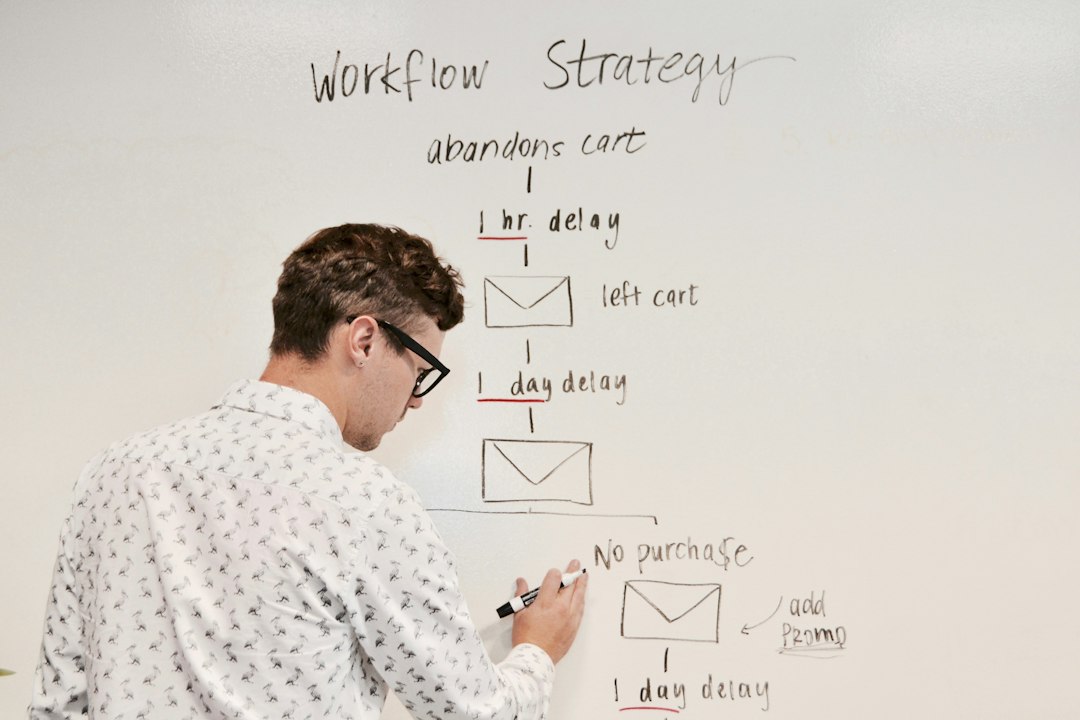
Advanced teams can use lead scoring, suppression lists, branching logic, re-enrollment rules, and contact property updates. These features help prevent sloppy communication. Nobody wants a paying customer to receive a “start your free trial” email. Nobody wants a cold lead to get a hard sales pitch after reading one article.
The catch is that workflow power depends on the plan. Free and starter tools are useful, but more serious automation usually sits in higher tiers. Teams should map their email needs before buying. If they only need monthly newsletters, HubSpot may be more system than they need.
Where HubSpot Can Feel Limited
HubSpot is broad, and that can be both helpful and irritating. The platform covers email, CRM, forms, automation, ads, reporting, landing pages, chat, service, and content tools. This saves time when everything fits. It creates clutter when a team only needs one or two features.
Common pain points include:
- Pricing growth: Costs can rise as contact lists, users, and feature needs grow.
- Feature gating: Some valuable tools sit behind higher plans.
- Learning curve: Workflows, lists, properties, and reporting require setup care.
- Email design limits: The builder is good, but specialist email design tools may offer finer control.
- Portal cleanup: Older lists, forms, workflows, and properties can pile up if no one manages them.
HubSpot rewards organized teams. It punishes messy ones. If naming rules, lifecycle stages, and contact properties are unclear, the platform can become noisy.
Best Use Cases
HubSpot Email Marketing fits B2B companies, SaaS firms, agencies, consultancies, schools, and service businesses that rely on lead nurturing. It also works well for teams that need sales follow-up tied to email behavior.
For ecommerce, HubSpot can work, especially with integrations. Still, brands that depend heavily on product recommendations, cart recovery, and purchase-based messaging may prefer ecommerce-first tools.
Top HubSpot Email Marketing Alternatives
- Mailchimp: Best for simple newsletters and small businesses that want a familiar tool. It is easier to start with, though CRM depth is lighter.
- ActiveCampaign: Strong for automation-heavy teams. It offers powerful sequences and segmentation, often at a lower cost than full HubSpot setups.
- Brevo: Good for budget-conscious teams that need email, SMS, and transactional messaging. Pricing based on email volume can help some senders.
- Klaviyo: Best for ecommerce brands using Shopify, WooCommerce, or similar platforms. Its purchase behavior targeting is a major strength.
- Constant Contact: Suitable for local businesses, nonprofits, and event-focused marketing. It is simple, but less deep for complex automation.
- Campaign Monitor: A clean choice for polished email design and straightforward campaigns. It works well for agencies and content-led brands.
How Teams Should Choose
Teams should start with their real process, not a feature checklist. If sales needs to see email engagement, HubSpot is a strong pick. If the goal is only a weekly newsletter, a lighter platform may be cheaper and faster.
They should also check contact volume, required automation steps, reporting needs, CRM requirements, and integration plans. A tool that feels affordable with 2,000 contacts may look very different at 50,000 contacts.
HubSpot is best when email is part of a larger revenue system. It is less ideal when email is just a broadcast channel. For the right team, its CRM connection can improve timing, targeting, and follow-up. For the wrong team, it may feel like paying for a full kitchen just to make toast.
FAQ
Is HubSpot Email Marketing free?
HubSpot offers free email marketing tools with limits. Paid plans add more advanced automation, reporting, testing, and scale.
Is HubSpot good for beginners?
Yes, beginners can create basic campaigns quickly. More complex workflows and CRM setup take more practice.
Can HubSpot automate email sequences?
Yes. HubSpot can automate welcome emails, nurture campaigns, lead scoring actions, sales alerts, re-engagement emails, and customer follow-ups.
What is the best HubSpot alternative?
It depends on the use case. Mailchimp is strong for simple campaigns, ActiveCampaign for automation, Brevo for budget control, and Klaviyo for ecommerce.
Is HubSpot better than Mailchimp?
HubSpot is usually better for CRM-driven marketing and sales alignment. Mailchimp is often simpler and cheaper for newsletters and basic campaigns.
Who should use HubSpot Email Marketing?
It suits teams that need email tied to CRM data, lead nurturing, sales follow-up, and campaign reporting across the full customer journey.

